A real French-English bilingual interface renders every screen, notification, and document natively in the user's chosen language, not just the buttons. If a tool cannot show you a sample invoice, a sample email, and its admin panel in both French and English on request, it is not bilingual. It is translated, which is a different and weaker thing. Before you sign anything, run three checks: full interface coverage, transactional documents in the chosen language, and per-user language memory that survives login sessions.
TL;DR:
- A truly bilingual interface shows all screens, notifications, and documents in the user's preferred language, not just translated static elements.
- Proper bilingual software separates interface strings, templates, and content to prevent mixing languages and ensure consistency across transactional documents.
- Language settings on mobile devices require apps to have built-in resource files for per-app language support; otherwise, only system language changes apply.
- URL structures and hreflang tags should be planned from the start to avoid misindexing and ensure content parity for search engines in both languages.
- Transactional materials like invoices and contracts must match the user’s language preference to maintain legal clarity and avoid trust issues.
Table of Contents
- Interface Bilingue Français Anglais: Native vs. Translated, and Why It Matters
- Technical Architecture: Separating Strings, Templates, and Content
- Mobile and OS Language Handling: What Android and iOS Actually Control
- Content and SEO for Bilingual Websites: URLs, Hreflang, and Locale Structure
- Transactional Language and Compliance: Invoices, Contracts, and Notifications
- Decision Checklist: What to Ask Before You Buy or Build
- Testing a Bilingual Interface: QA Scripts That Catch Real Gaps
- Keeping French and English Content in Sync Over Time
- Best Practices for Testing Bilingual Interfaces With Real Users
- Accessibility in a Bilingual Interface: What Changes When You Add a Second Language
- Handling Language Preferences and Automatic Detection
- Beyond Word-for-Word: Cultural Localization in French and English Interfaces
- Perspective: The Real Payoff of Doing Bilingual Right
- See a Working Example: MyTenue's Bilingual App and Published Pages
- Sources
- FAQ
Interface Bilingue Français Anglais: Native vs. Translated, and Why It Matters
A translated interface swaps out visible labels. A native bilingual interface treats language as a setting that touches everything a user sees, downloads, or receives by email. The gap between the two only shows up once you're actually using the product.
Picture a French user who signs up in French, then gets a password reset email in English because the transactional template was never localized. Or an English-speaking client who receives a French-language invoice because billing logic pulls straight from the database default, ignoring the account's language preference. These are not edge cases. They are the single most common failure pattern in software that claims bilingual support but only translated the marketing site.
SPIP's own documentation draws a useful line here: interface localization (translating menus, buttons, and system messages) is a separate task from publishing multilingual content (writing the same article in two languages). A tool can localize its interface without ever handling multilingual content, and vice versa. Confusing the two is how procurement teams get surprised later.
Before buying or building, ask a vendor to show you:
- A password reset or order confirmation email in both languages
- A generated invoice or receipt in both languages
- The admin backend switched to English, not just the client-facing app
- A support ticket handled entirely in the user's non-default language
Technical Architecture: Separating Strings, Templates, and Content
Under the hood, a proper bilingual build keeps three things apart: interface strings (button labels, error messages), templates (the invoice layout, the email skeleton), and content (the actual product descriptions or blog posts). Mixing them is what causes half-translated screens.
The standard approach uses externalized resource files, often called i18n keys. Instead of hardcoding "Add to cart" into a template, the code references a key like cart.add_button, and a French or English string file resolves it at render time. Sinao's own documentation describes exactly this separation for its bilingual accounting software, where UI labels, generated invoices, and client communications all pull from language-aware resources rather than static text.
Three things matter most in this setup:
- Format localization. Dates, decimal separators, and currency labels differ between French and English conventions, and a template that hard-codes "MM/DD/YYYY" will look wrong to a French reader.
- Transactional templates get the same treatment as UI. An invoice generator has to read the client's stored language preference, not the sender's default.
- Translation workflow discipline. Automated translation speeds up rough drafts, but professional post-editing catches the domain-specific terms that machine translation gets wrong, particularly in legal and financial language.
Pro Tip: Ask any vendor whether their invoice templates pull from the same string files as their UI, or whether invoices were hardcoded separately. If the answer is "separately," expect language mismatches at the worst possible moment: billing.
Mobile and OS Language Handling: What Android and iOS Actually Control
Your phone's language setting is not a magic switch that fixes a poorly built app. Since Android 13, users can set a language for an individual app independent of the device's system language, but only if that app ships the language resources to support it. Recent versions of iOS and macOS work the same way. Apple's own guidance confirms that users can assign languages per app under System Settings, but again, the app needs the underlying resource files or the setting does nothing visible.
This is worth testing directly rather than trusting a vendor's word:
- Open the app's language setting on Android or iOS and switch it independently of the device language.
- Check whether every screen changes, or whether some sections stay in the original language.
- Note any hardcoded strings left behind. These often show up in onboarding flows, tooltips, and error states.
Quick test: if the option to change an app's language isn't even offered separately from the device settings, that is a strong signal the app never built in per-app language resources at all.
Content and SEO for Bilingual Websites: URLs, Hreflang, and Locale Structure
Your URL strategy for French and English content should be decided before a single page gets built, not patched in afterward. The three common patterns are subfolders (site.com/fr/ and site.com/en/), subdomains (fr.site.com), and separate country-code domains. Subfolders are usually the easiest to maintain and the most common choice for bilingual French-English sites, since they keep both languages under one domain authority.
Hreflang tags and the HTML lang attribute tell search engines which language and region a page targets, and getting this wrong causes Google to show French pages to English searchers or vice versa. One common technical pitfall is treating French as an afterthought translation rather than a first-class locale with its own URL structure and metadata from the start.
A few rules keep this clean long term:
- Give every page a full French equivalent, not a partial one. Content parity matters more to search engines than perfect prose.
- Use
hreflang="fr"andhreflang="en"consistently, and point each to the correct canonical URL. - Keep UI strings like "Add to Cart" out of crawlable content entirely. Search engines should index your articles and product pages, not your button labels.
Transactional Language and Compliance: Invoices, Contracts, and Notifications
The parts of a product that carry legal or financial weight need the same language discipline as the interface, arguably more. A client who signed up in English but receives a contract in French has a real basis to question what they agreed to.
At minimum, these should always match the user's stored language preference:
- Invoices and receipts
- Contracts and terms of sale
- Payment confirmations and refund notices
- Support emails and automated notifications
Inconsistency here does more than annoy someone. A French-speaking client who gets an English invoice, or vice versa, may have genuine trouble reconciling that document for their own accounting or tax records. When evaluating a vendor, ask for a sample receipt in each language and a language-specific version of the terms of sale, and confirm what languages their support team actually operates in.
Decision Checklist: What to Ask Before You Buy or Build
Run through this list with any vendor pitch, or use it to scope an internal build:
- Does each user account store its own language preference, independent of the browser or device?
- Can you get a sample invoice, receipt, and confirmation email in both French and English?
- Does the admin backend switch language too, or only the customer-facing screens?
- What's the translation workflow: machine translation only, machine translation with professional post-editing, or fully human?
- Are locale-specific SEO pages (with correct hreflang) part of the offering, or bolted on later?
- What languages does support actually operate in, and during what hours?
Pro Tip: If a vendor can't produce a sample bilingual invoice within a day, that's a red flag worth weighing heavily. Invoices are usually the last thing teams localize, so a vendor who has them ready has genuinely finished the job.
Testing a Bilingual Interface: QA Scripts That Catch Real Gaps
Run a full account lifecycle in each language: signup, language switch mid-session, a purchase, the resulting invoice, and one admin-side action. Repeat with mixed-language inputs, like a French name typed into an English-language form, to catch encoding or sorting bugs.
- Grep the codebase for hardcoded French or English strings outside the resource files. This finds missed translations faster than manual browsing.
- Run an automated audit that lists any translation keys missing a counterpart in the other language.
- Have a fluent human reviewer read transactional emails and invoices end to end, not just skim for obviously broken text.
For a reference point on how a company can document its own bilingual commitments publicly, MyTenue publishes its terms of sale and mentions légales in French alongside an English terms of sale page, a useful pattern to study regardless of which product you're evaluating.
Keeping French and English Content in Sync Over Time
The hardest part of running a bilingual product isn't launch day. It's month fourteen, when the English site has three new feature pages and the French site has one, because someone shipped the update and the translation request got stuck in a backlog. This drift is the most common long-term failure in bilingual software and content, and it tends to compound quietly until a customer notices.
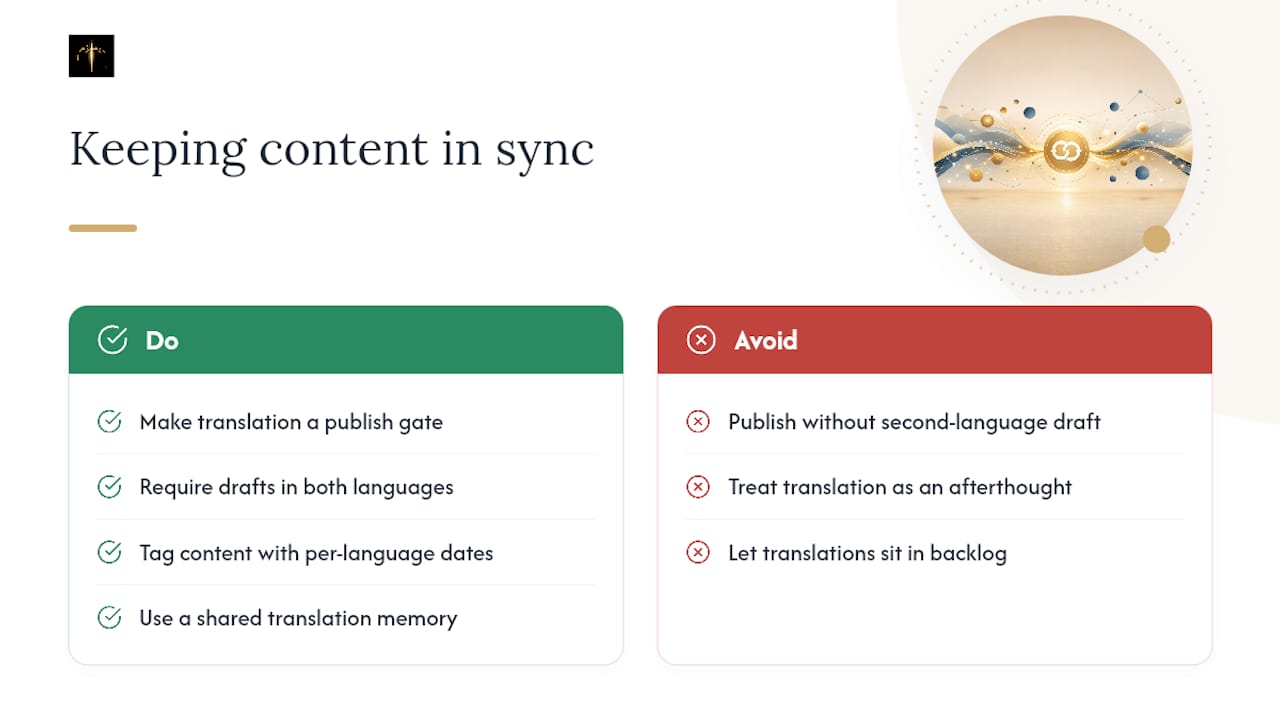
The root cause is usually organizational, not technical. Content updates get approved and published in one language first, often because the person writing them is more comfortable in it, and the second language becomes a follow-up task that competes with other priorities. Without a hard rule that blocks publishing until both versions are ready, English or French content pages fall permanently behind.
A workable fix is treating translation as a gating step in the publishing workflow itself, not a separate task assigned after the fact. If a content management system allows a page to go live in French without its English counterpart being at least drafted, that gap will happen eventually. Version control also helps: tagging each piece of content with its last-updated date per language makes it obvious at a glance which side is stale.
Some teams solve this with a shared translation memory, where previously approved phrases and terms get reused automatically, cutting the lag between "content approved in French" and "content ready in English." This doesn't eliminate the need for human review, particularly for anything customer-facing or transactional, but it does shrink the backlog problem that causes most drift in the first place.
Best Practices for Testing Bilingual Interfaces With Real Users
Testing a bilingual product with only one language group tells you half the story at best. Recruit test participants who are native speakers of each language, not just bilingual staff internally, since fluent employees tend to unconsciously fill in gaps that a real user would stumble on.
Run identical task scripts in both languages: same signup flow, same purchase path, same support scenario. If a French-speaking tester completes checkout in 90 seconds and an English-speaking tester struggles for four minutes on the same flow, that gap almost always points to a translation or layout issue rather than the tester's ability.
Pay close attention to text expansion and contraction. This is one of the most common cosmetic bugs testers report and one of the easiest to miss if you only test in English during development.
Include at least one test session where the participant switches languages mid-task, closing the app and reopening it, or explicitly changing the language setting partway through a workflow. This surfaces bugs that a single-language test session never catches, like a shopping cart that resets or a form that partially reverts to the default language after a page refresh.
Finally, test with real transactional artifacts, not placeholder data. A tester should receive an actual confirmation email or invoice during the session, not a mockup, since that is where hardcoded strings and broken templates most often hide.
Accessibility in a Bilingual Interface: What Changes When You Add a Second Language
Accessibility and bilingual support intersect more than most product teams expect, and screen readers are the clearest example. A screen reader needs the page's lang attribute set correctly for each block of text so it can switch pronunciation engines automatically. A French sentence read aloud with an English pronunciation engine, or vice versa, becomes unintelligible to a blind or low-vision user relying on that reader.
This means a bilingual page that mixes French and English content in the same view, a common pattern for language switchers or partial translations, needs granular lang tags on each language segment, not just one tag at the top of the page. Skipping this is a frequent oversight even on sites that otherwise handle translation well.
Keyboard navigation and focus order also deserve a second look once a language toggle is added. If the language switcher isn't reachable by keyboard or doesn't announce its current state to a screen reader, users relying on assistive technology may not even know a second language option exists.
Text-to-speech and captioning for any video or audio content need a French and English version each, matched to the interface language, not just subtitles bolted onto whichever language the video happened to be recorded in. And color contrast standards apply equally to both languages, but font rendering can differ: French accented characters (é, à, ç) sometimes render with different weight or spacing in certain typefaces, which can affect readability for users with low vision.
Handling Language Preferences and Automatic Detection
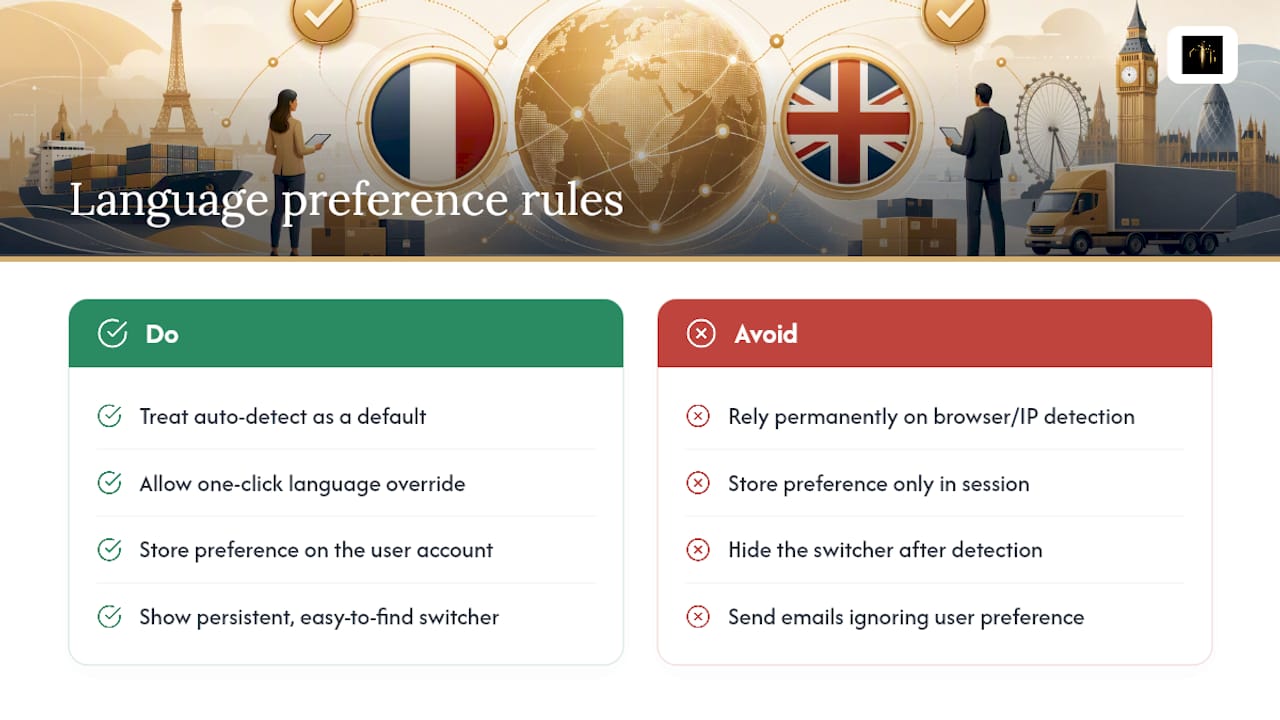
Automatic language detection based on browser settings or IP address is a reasonable first guess, never a permanent decision. Browser language headers are notoriously unreliable: a French user traveling with an English-language work laptop will get English content on first visit, and an IP-based guess fails outright for anyone using a VPN.
The fix is to treat that first automatic guess as a default, then let the user override it in one click, and store that choice against their account rather than their session. Once a user has explicitly picked French or English, the interface should never silently revert to auto-detection again, even after logging out and back in from a different device.
For logged-out visitors, a cookie can hold the preference between visits, but that preference should always be visible and changeable from a persistent, easy-to-find language switcher, not buried three menus deep in settings. Hiding the switcher after the initial detection is one of the more common frustrations reported in bilingual product feedback.
Server-side, the language preference should propagate to every downstream system: the email service, the invoicing engine, and any third-party support tool. A user who picks English in the app but keeps receiving French emails from a disconnected email platform is experiencing exactly the kind of architectural gap covered earlier in the discussion of separated string files and templates. Preference has to be one single source of truth, checked everywhere content gets generated, not a setting that only touches the screen currently in front of the user.
Beyond Word-for-Word: Cultural Localization in French and English Interfaces
A perfectly translated sentence can still feel wrong to a native reader, and this is where localization and translation part ways. Formality is the clearest example: French business communication defaults to the formal "vous," while English has no equivalent distinction, so a direct translation can accidentally sound either stiff or presumptuous depending on which direction you're translating.
Date formats carry the same risk in the opposite direction. An American-style date like 03/04/2026 reads as March 4 to an English-speaking user and April 3 to a French-speaking one, which makes an untranslated date field a genuine source of confusion rather than a cosmetic detail. Spelling out the month, as in "4 March 2026" or "4 mars 2026," removes the ambiguity entirely.
Tone matters just as much as grammar. Marketing copy that leans on humor or idiom in English ("nail it," "game on") rarely survives literal translation into French, and a good localization process rewrites for the same intent rather than the same words. This is precisely the gap that separates a machine-translated interface from one reviewed by a professional translator familiar with both markets, echoing the workflow distinction covered earlier regarding automated translation versus professional post-editing.
Even something as small as address formats, phone number patterns, and measurement units (metric versus imperial) signals to a user whether a product was genuinely built with their market in mind or simply had its labels swapped.
Perspective: The Real Payoff of Doing Bilingual Right
Bilingual quality is a trust signal disguised as a technical detail. A French client who gets a clean, correctly formatted invoice in their own language trusts the business behind it more, often without consciously noticing why. The trade-off is real: rigorous translation governance slows shipping speed. Most teams that skip it pay for it later in support tickets, not savings.
— Ahmed
See a Working Example: MyTenue's Bilingual App and Published Pages
Some apps provide genuinely useful examples of native bilingual user experience beyond marketing materials.
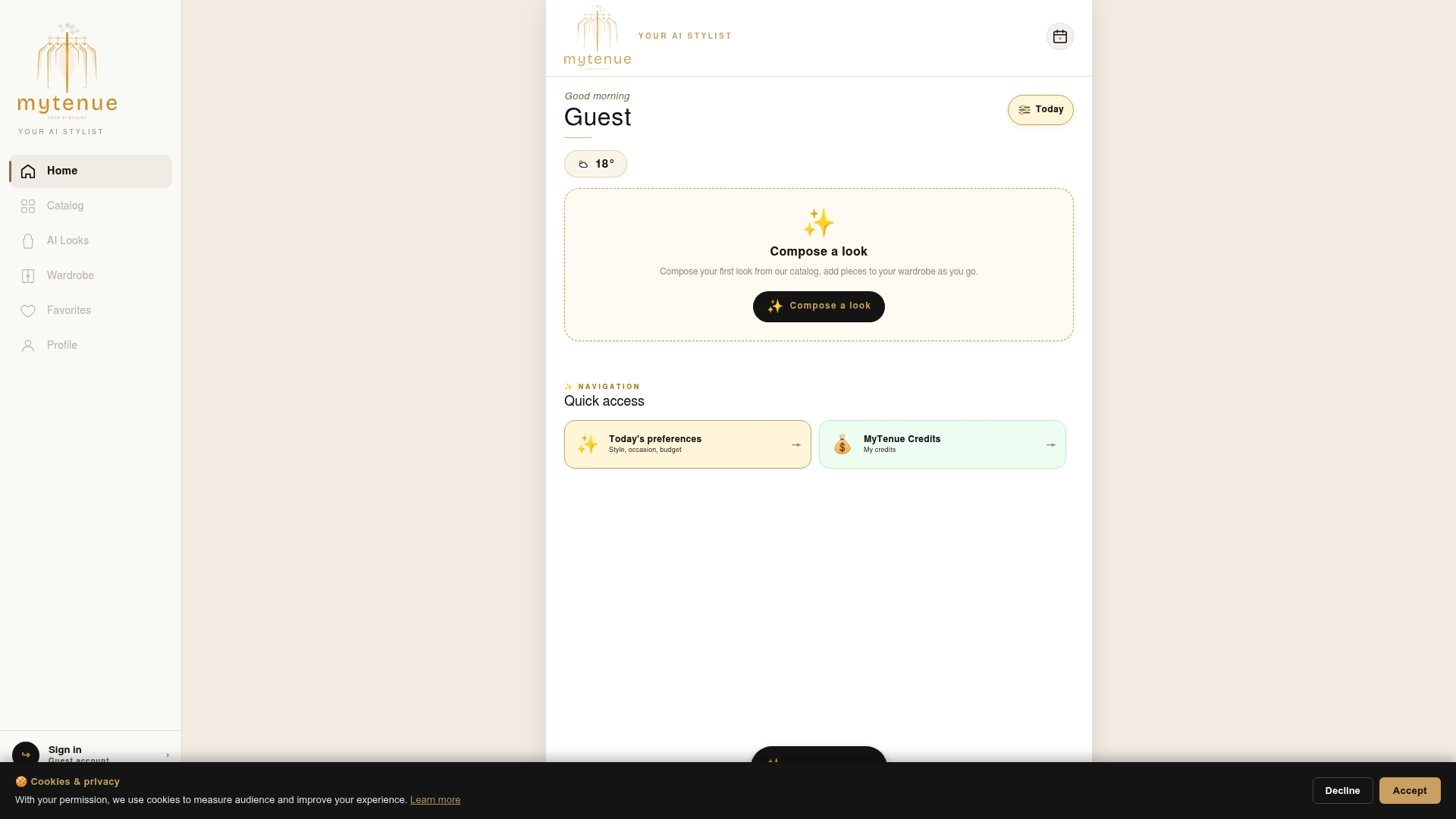
Some apps offer switching between French and English, including wardrobe organization tools, outfit scoring, and flows for generating AI-based outfit recommendations. If you want a real-world example of how transactional pages should read in both languages, MyTenue's published mentions légales and terms of sale, alongside the English version, show exactly the kind of parallel documentation this article recommends checking for. It's worth inspecting those pages side by side to see what consistent wording and structure actually look like, independent of whether you ever use the app for its intended purpose. And if you're curious about the AI recommendation engine itself, MyTenue's outfit curation approach is described in detail on the blog. Try the bilingual interface directly by checking the Free, Basic, Premium, and Gold plans and switching the language setting once you're in.
Sources
- Modify the language an app uses on your phone - Android Help
- Change the language your Mac uses - Apple Support
- Sinao : une interface accessible dans deux langues
FAQ
What's the best app for becoming bilingual in English?
No single app makes someone bilingual on its own; consistent daily practice across listening, speaking, and reading matters more than the tool. Bilingual reading apps and dictionaries, such as Le Grand Robert & Collins, are useful for vocabulary and context but work best alongside real conversation practice.
Where can I find free bilingual French-English books in PDF form?
Public domain literature sites and library platforms often host classic bilingual editions for free, though quality and formatting vary widely between sources. Always check that the translation is professionally reviewed rather than machine-generated if accuracy matters for your purpose.
What's the best software for translating French to English?
For casual use, mainstream machine translation tools handle straightforward text reasonably well, but professional and transactional content, contracts, invoices, and legal notices need human post-editing, as Sinao's own documentation on bilingual software makes clear. Treat machine translation as a first draft, not a final answer, for anything with legal or financial weight.
Is it possible to become bilingual in one year?
It's possible for some learners with intensive daily immersion, but for most people working around a full schedule, meaningful fluency typically takes longer. Consistent exposure, structured practice, and real conversation tend to matter more than any single timeline.
How much does MyTenue's bilingual app cost?
MyTenue offers a Free plan alongside paid Basic, Premium, and Gold tiers, each available on the MyTenue app page with current pricing listed there.