
Yes, you can plan and organize a suitcase entirely through a smart packing app. The fastest, least stressful method combines a short "master list" of your essentials with an AI packing assistant, or an outfit planner like Mytenue, to generate bag assignments and export a checklist. That single step removes most of the guesswork and the 11 PM repacking panic.
TL;DR:
- Packing apps with weather and activity intelligence help tailor your list to specific trip conditions and planned activities, reducing overpacking and last-minute changes.
- Offline access, sharing capabilities, and on-device AI processing protect your privacy and ensure functionality in remote areas or without internet.
- Building a personal master list and adjusting it per trip saves time and improves suggestions through repeated use, especially when reusing or customizing for different destinations.
- Most free app tiers provide essential features like basic checklist creation and weather forecasts, with premium upgrades worthwhile for frequent or multi-destination travelers.
- Digitizing your wardrobe and using AI outfit planning simplifies packing and ensures outfit choices match weather and itinerary needs, minimizing guesswork and stress.
Table of Contents
- How Do You Plan a Suitcase With an App?
- What Should You Look For in a Packing App?
- What's the Best Workflow for Packing With an App?
- Is It Safe to Share Your Travel Data With a Packing App?
- What Do Packing Apps Cost?
- A Real Packing Routine That Actually Cuts Stress
- Turn Your Outfits Into a Packing List With Mytenue
- Sources
- FAQ
How Do You Plan a Suitcase With an App?
Planning a suitcase with an app works because the software does the math you'd otherwise do in your head, badly, at midnight. Enter your destination, dates, and planned activities, and a decent packing app cross-references weather data, trip length, and item categories to build a checklist tailored to that specific trip.
The best tools go further than a static template. Here's what separates a genuinely useful packing app from a glorified checklist:
- Weather-aware suggestions. The app pulls a forecast and converts it into actual items: a rain shell if storms are likely, a warmer base layer if nights dip below 50°F.
- Activity-driven quantities. A five-day beach trip with two hikes needs different sock counts than a five-day business trip, and apps that factor in activities adjust quantities and add specialty gear accordingly.
- Offline mode and sharing. Family trips or group travel benefit from lists that sync without Wi-Fi and update when someone else checks an item off.
- Weight tracking and bag assignment. Assigning items to specific bags and estimating weight helps you dodge surprise checked-bag fees before you're standing at the counter.
None of this replaces judgment. It just removes the repetitive parts of packing so your judgment goes toward the decisions that actually matter, like whether you need a third pair of shoes.
What Should You Look For in a Packing App?
Not every packing app deserves a spot on your home screen. Before you commit to one, run it through a short mental checklist built around the features that actually change your travel experience.
- Privacy model. Decide if you're comfortable with cloud processing, or if you'd rather your itinerary and location data stay on your device. On-device intelligence reduces data exposure and speeds up list generation compared with apps that route everything through a server.
- Offline access and sharing. Confirm the app works without signal (useful on flights and in remote areas) and that it lets you share a list with a partner or family member in real time.
- Weather and activity intelligence. Look for multi-destination import and reusable templates, especially if you take similar trips often, like recurring business travel or annual ski weeks.
- Bag-weight tools and export options. Per-bag weight estimates and a printable or exportable checklist matter more than they sound, particularly for budget airlines with strict limits.
- Cost versus value. Check what the free tier actually includes before assuming you need to pay. Many apps cover basic list generation and weather integration for free, and only paywall the extras.
Pro Tip: Build your master list once, in a notes app or the packing app itself, then reuse it every trip. Experienced travelers who save a personal essentials list report the app's suggestions get sharper each time, since it stops recommending things you never pack.
Skip any app that forces an account just to generate a basic list. That's usually a sign the "free" tier is a lead magnet, not a real feature.
What's the Best Workflow for Packing With an App?
A repeatable sequence beats reinventing your process every trip. Here's the workflow that scales from a weekend trip to a three-country itinerary.
- Build a master list once. Log your non-negotiables (chargers, toiletries, medications) so future recommendations start from your real habits, not generic defaults.
- Create the trip profile. Add your destination, dates, and activities, then review how the weather forecast changes suggested quantities. A trip with rain in the forecast should visibly shift your packing list, not just add an umbrella as an afterthought.
- Assign items to bags. If the app supports weight estimates, use them, especially when you're checking one bag and carrying on another.
- Share with travel companions. Send the list to whoever you're traveling with and set a reminder a day or two before departure so nothing gets packed twice, or forgotten entirely.
- Do a final offline check. Export a printable version or rely on offline mode the night before, since hotel Wi-Fi is not something you want to bet your packing list on.
For multi-stop trips, generate a list per destination first, then consolidate into one bag assignment. Apps that support multi-stop planning still usually require a manual pass to catch duplicate items across legs.
Is It Safe to Share Your Travel Data With a Packing App?
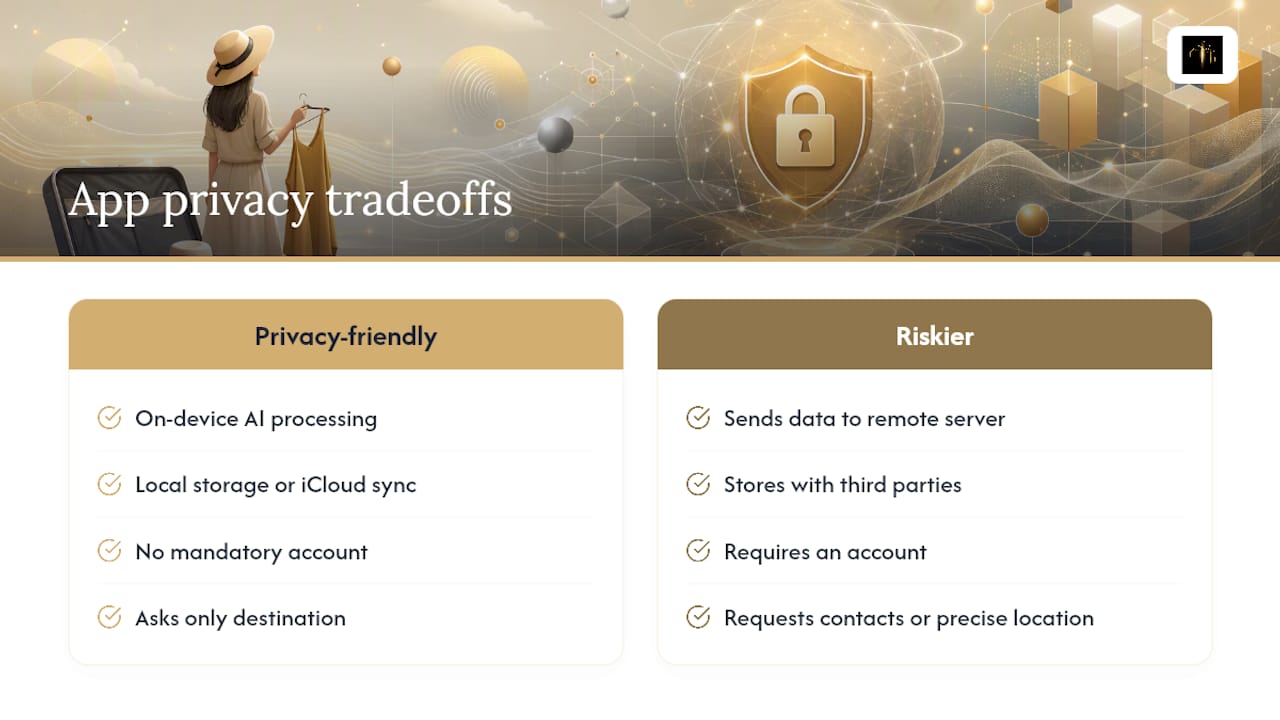
Sharing travel details with an app means handing over dates, destinations, and sometimes your exact address. That's worth pausing on before you input a full itinerary into any random download.
On-device AI keeps most of that processing local to your phone instead of sending it to a remote server. It's both a privacy improvement and a speed one, since the app isn't waiting on a round trip to the cloud to generate suggestions. Apps that favor local storage or sync through something like iCloud, rather than requiring a mandatory account, tend to store less of your data with third parties in the first place.
Before you input a full itinerary, check the app's permissions screen. If it's asking for contacts or precise location when all it needs is a destination city, that's a signal to look elsewhere.
Mytenue's approach to outfit planning follows the same logic: build outfits from wardrobe personalization best practices and weather formulas without requiring you to hand over more than you need to.
What Do Packing Apps Cost?
Most packing apps run on a freemium model, and the free tier usually covers more than people expect. Basic list generation and simple weather integration are typically free, while premium subscriptions unlock multi-destination import, extended forecasts, and cross-device sync, often for a small monthly fee.
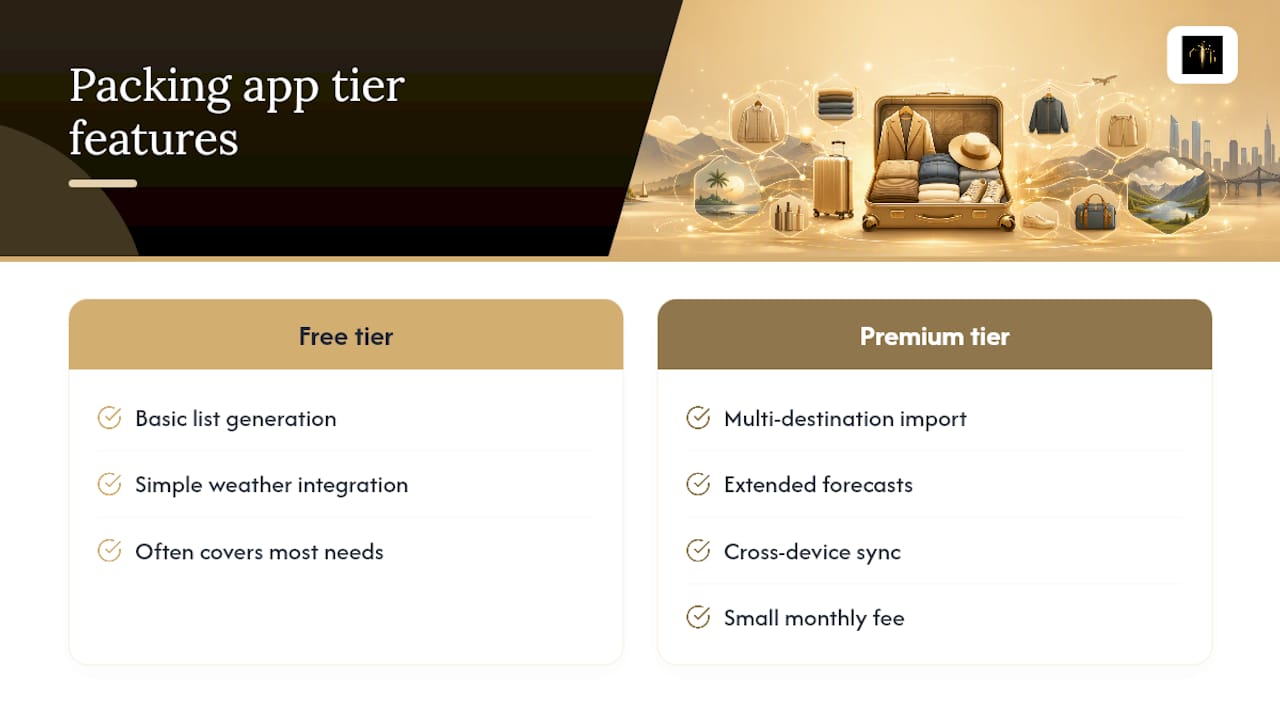
Whether the upgrade is worth it depends on travel frequency and needs; more frequent travelers and those with multi-destination trips often find premium features more valuable.
If you're only packing for one trip this year, don't pay upfront. Let the free tier prove itself first.
A Real Packing Routine That Actually Cuts Stress
A three-city trip used to mean three separate mental packing lists and at least one panicked repack at the airport. Building a master list once and letting an app adjust it per destination changed that. The result on one recent multi-stop trip: fewer duplicate items across cities, and one less checked bag than the previous trip with a similar itinerary.
That's not a dramatic transformation, just a quieter one. The same routine adapts easily: a business traveler swaps in extra dress shirts and a suit bag, a family adds kid-specific quantities, and an adventure traveler adds the specialty gear their next stop calls for.
— Ahmed
Turn Your Outfits Into a Packing List With Mytenue
Mytenue is built around a problem packing apps don't solve well: deciding what to actually wear before you decide what to pack. Instead of a generic checklist, Mytenue starts with your real wardrobe and builds outfits from it using AI.
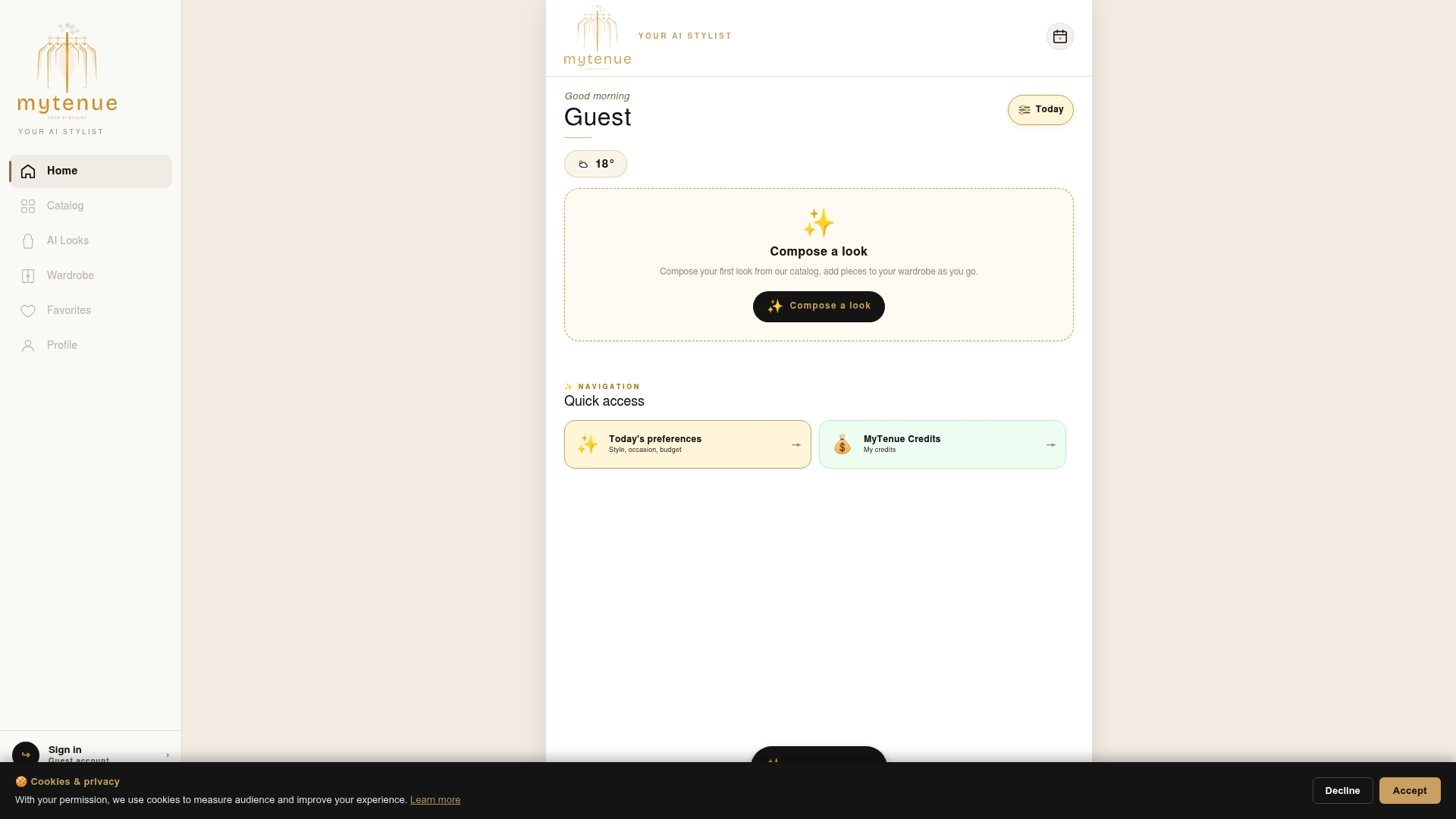
Here's what that looks like in practice:
- AI-generated outfit recommendations pulled from your own digitized wardrobe, not a generic catalog
- Weather-adapted outfit suggestions based on temperature-band formulas
- Calendar-based outfit planning so your trip days are already mapped to specific looks
- Virtual try-on with personal avatars, so you know what an outfit actually looks like before it's in your bag
Start by digitizing 8 to 12 core wardrobe pieces, enough variety for the AI to build a full week of outfits. Once your trip days are mapped to specific looks in the calendar, transcribe that outfit list into your packing checklist and you've skipped the guesswork entirely.
The app offers a Free plan to start, with paid tiers that provide additional features as needed. Explore the Mytenue app and build your first trip outfit plan today.
Sources
For deeper reading on the privacy tradeoffs and outfit-planning methods referenced here, see on-device AI travel privacy, Mytenue's AI wardrobe personalization guide, and, for readers exploring specialized gear like bikepacking accessories, this packing guide from The Beam.
- On-device AI travel privacy
FAQ
What Is the Best App for Packing a Suitcase?
The best packing app depends on whether you want a standalone checklist tool or an outfit-first workflow. If you'd rather build your packing list from actual outfits, Mytenue's weather-adapted outfit planning turns your wardrobe into a trip-ready checklist instead of a generic item list.
What's the Best App for Planning a Trip?
A good trip-planning app should handle destination, dates, and activities in one place, then adjust suggestions as weather or plans change. Look for offline access and sharing so travel companions stay coordinated without needing signal.
What Is the Best Planning App Overall?
There's no single universal answer, since the "best" app depends on whether you're planning logistics, outfits, or both. For packing specifically, apps that combine weather intelligence with activity-based quantity adjustments consistently outperform static checklist templates.
Which AI Should You Use to Plan a Trip?
Use an AI tool that's transparent about how it processes your data, ideally one that favors on-device processing over sending your itinerary to a server. On-device AI improves both privacy and response speed compared with cloud-only alternatives.
How Much Does Mytenue Cost?
Mytenue offers a Free plan plus several paid subscription tiers. Full plan details are available on the Mytenue app page.