
An intuitive fashion app is one where you get a personalized outfit suggestion before you've had your second cup of coffee, without digging through menus or manually tagging every item in your closet. In UX terms, an app is intuitive when a user can understand how it works almost immediately and doesn't have to fight the interface to complete basic tasks. In fashion terms, it means the app mirrors how you actually think about getting dressed: occasion first, then vibe, then the specific pieces. When both of those things work together, you get something genuinely useful. Mytenue is built on exactly that combination.
Key Takeaways
An intuitive fashion app combines low-friction UX with personalization that mirrors how you naturally think about getting dressed, delivering relevant outfit suggestions fast and improving with every use.
| Point | Details |
|---|---|
| "Intuitive" is measurable | Task success rate, time to first outfit, and onboarding completion are the real benchmarks. |
| Features that matter most | Auto-tagging, visual try-on, contextual recommendations, and easy data controls define a truly intuitive experience. |
| Five-minute evaluation | Run the time-to-first-outfit test, onboarding friction test, and relevancy test before committing. |
| Misconception to drop | Intuitive does not mean zero learning; it means minimal friction and fast value delivery. |
| Mytenue's approach | Wardrobe digitization, AI outfit generation, avatar try-on, and weather-aware planning map directly to the intuitive app checklist. |
Table of Contents
- What does "intuitive" mean in app design?
- How personal style intuition maps to app behavior
- Which features actually make a fashion app feel intuitive?
- How to tell if an app is truly intuitive in five minutes
- What you actually gain from an intuitive fashion app
- How Mytenue puts "intuitive" into practice
- How to choose the fashion app that fits you
- Intuitive vs. non-intuitive fashion apps: the real differences
- Common misconceptions about intuitive fashion apps
- The part most people overlook about "intuitive" design
- Mytenue fits the checklist, right out of the box
- Sources
What does "intuitive" mean in app design?
"Intuitive" is one of the most overused words in tech. What it actually means in UX is low cognitive load, predictable flows, and immediate ease of use. You open the app, and the path to your goal is obvious without reading a manual.
Here's the myth worth busting: intuitive rarely means "zero learning." Most of what feels effortless is actually built on familiar visual patterns and learned affordances. Skeuomorphism, the design approach that makes a digital button look like a physical one, works because users already know how buttons behave. The app borrows that familiarity. "Intuitive" is not magic. It's good design meeting prior experience.
For fashion apps specifically, measurable UX indicators include:
- Task success rate: Can a user complete their first outfit in under two minutes?
- Onboarding completion: Does setup feel fast enough that users finish it?
- Error rate: How often does a user tap the wrong thing or backtrack?
- Time to first outfit: The faster this is, the lower the friction.
Intuitive fashion search mirrors in-store shopping behavior: occasion first, then product type, then size, then style. Apps that replicate that mental sequence with clear visual cues, rather than jargon-heavy filters, dramatically reduce dead-end searches. Conversational AI assistants take this further, letting users describe what they want in plain language ("something smart-casual for a rooftop dinner") and returning shoppable results without requiring any fashion vocabulary at all.
How personal style intuition maps to app behavior
Intuitive personal style is the ability to make fast, confident outfit decisions that feel right for the moment. It's the difference between staring at your closet for 20 minutes and reaching for exactly the right thing in 30 seconds.
An app has to support both speeds. Consider two scenarios: you're dressing for a job interview versus a Saturday farmers market. For the interview, you need occasion-aware guidance, color compatibility checks, and confidence that the outfit reads as polished. For the weekend, you want quick, low-stakes suggestions that still feel like you. A truly intuitive fashion app handles both without making you switch modes or re-explain your preferences each time.
The overlap between personal style intuition and UX intuition is real: both depend on the system knowing your context and reducing the number of decisions you have to make consciously. When an app learns your taste and surfaces the right options at the right moment, it feels like it's reading your mind. That's not magic either. It's good personalization.
Which features actually make a fashion app feel intuitive?
Fashion apps that win in 2026 remove friction and reduce fit anxiety through personalization, speed, and visual-first experiences. Here's what to look for:
- Wardrobe digitization with auto-tagging: Upload a photo; the app identifies the item, color, and category automatically. Manual tagging is a friction killer.
- Fast onboarding: Style quiz under three minutes, with visual choices rather than text dropdowns.
- Visual-first discovery: Browse by look, not by category label. Outfit bundles and "shop the look" features reduce decision fatigue.
- Virtual try-on: Avatar-based previews let you see how an outfit moves, not just how it looks flat. Apps like Gensmo use animated previews to reduce fit uncertainty.
- Predictive fit intelligence: Accounts for fabric behavior and body variation, not just size labels.
- Contextual recommendations: Weather-aware and occasion-aware suggestions that update daily.
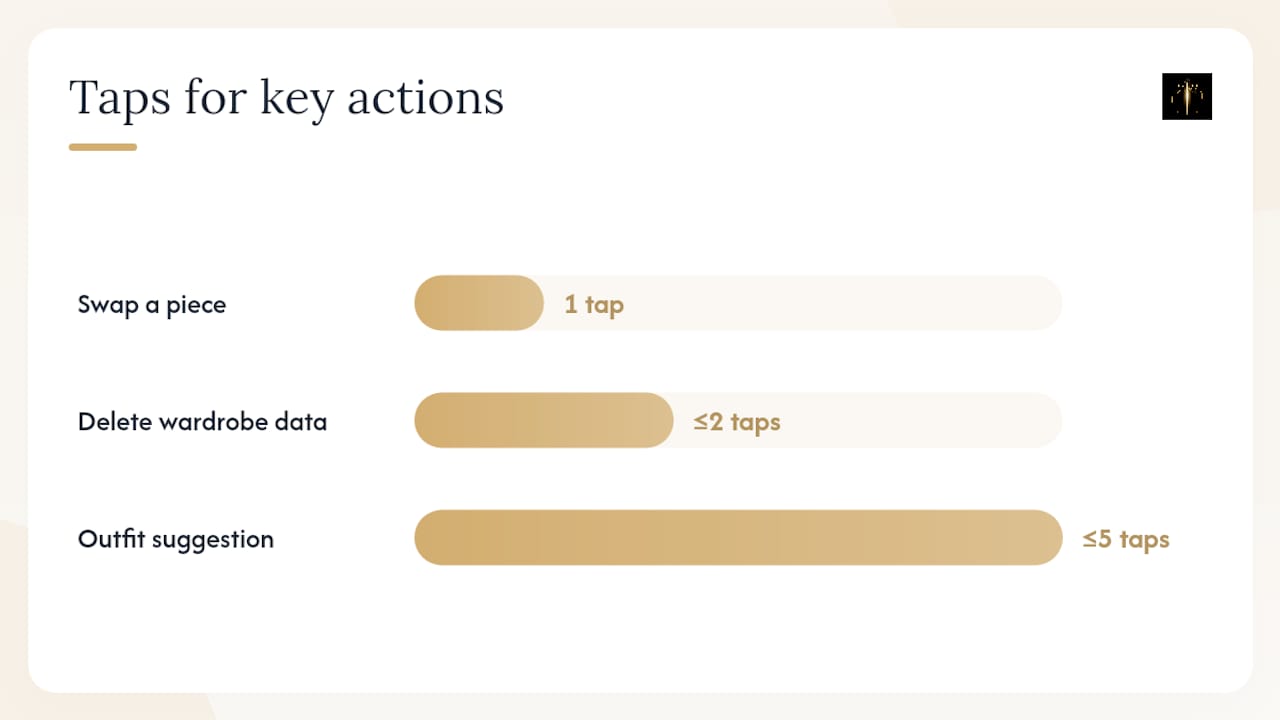
- Easy undo and customize: One tap to swap a piece without rebuilding the whole outfit.
- Clear privacy and data controls: You should be able to delete preferences or wardrobe data in two taps or fewer.
AI stylist apps typically include instant outfit generation, virtual try-on, and a personalized feed as baseline features. The difference between good and great is how fast those features activate and how little setup they require.
Pro Tip: Open any fashion app and try to get a complete outfit suggestion without tapping more than five times. If you can't, the onboarding or navigation is working against you.
How to tell if an app is truly intuitive in five minutes
Before you commit time or money, run these three quick tests:
- Time-to-first-outfit test. From a cold open, how long does it take to see a complete, personalized outfit? Under two minutes is a good benchmark. Over five minutes signals too much required setup.
- Onboarding friction test. Count how many items you have to manually tag or type during setup. More than ten manual inputs before you see any recommendations is a red flag.
- Recommendation relevancy test. Look at the first five outfit suggestions. Do at least three of them feel like something you'd actually wear? If they feel generic, the personalization engine hasn't been seeded well enough, or it doesn't exist.
Red flags to watch for:
- Jargon-heavy filters ("silhouette type," "fabrication weight") with no visual examples
- Slow virtual try-on that takes more than a few seconds to render
- No way to tell the app "I don't like this" and have it actually learn
- Privacy settings buried three menus deep, or no option to delete your data
Privacy is part of intuitiveness. If you can't easily adjust what the app knows about you, or remove data you no longer want stored, the experience isn't fully in your control.
What you actually gain from an intuitive fashion app
The benefits are concrete and stack quickly:
- Faster outfit decisions: Less time staring at your closet, more time doing everything else.
- Fewer returns: Virtual try-on and fit intelligence mean you buy with more confidence.
- Better wardrobe reuse: The app surfaces items you forgot you owned, reducing the urge to buy duplicates.
- Consistent personal style: Recommendations that learn your taste keep your wardrobe coherent over time.
- Occasion-ready confidence: You show up dressed right, without last-minute panic.
Picture this: you get a last-minute dinner invitation for tonight. You open the app, tap "dinner out," and within 90 seconds you have three complete outfit options built from what's already in your closet, ranked by weather appropriateness. You pick one, add it to your calendar, and move on. That's the low-effort, high-confidence outcome a well-built fashion app delivers.
How Mytenue puts "intuitive" into practice
Mytenue maps directly to the feature checklist above. Here's how each piece works in practice:
- Wardrobe digitization: Upload photos of your clothes; Mytenue auto-tags items by color, fabric, style, and occasion category.
- AI outfit generation: The AI analyzes color compatibility, fabric pairing, and occasion fit to build complete looks from your wardrobe.
- Virtual try-on with personal avatars: High-quality avatar rendering shows how outfits look on your body shape, not a stock model.
- Weather-aware daily suggestions: Mytenue pulls current weather data and adjusts recommendations automatically, no manual input needed.
- Calendar-based outfit planning: Plan outfits for the week ahead and avoid the morning scramble.
- Bilingual interface (French/English): Accessible to a wider range of users without switching apps.
- Premium catalog with loyalty credits: Browse curated new items that complement your existing wardrobe, with credits earned through use.
A typical first session: sign up, complete a three-minute style quiz, upload five to ten wardrobe photos, and receive your first AI-generated outfit within minutes. From there, Mytenue's AI curates complete looks that get sharper as you rate and save outfits. Adding a week's worth of calendar planning takes another five minutes. The wardrobe digitization and outfit planning features are where most users feel the biggest time savings.
Recommended: include a screenshot of the wardrobe digitization screen and one AI-generated flat-lay outfit image near this section on publish.
How to choose the fashion app that fits you
Not every intuitive app is the right fit for every person. Here's a fast prioritization checklist:
- Time savings: Does the app generate a complete outfit in under two minutes? That's the baseline.
- Style fidelity: After a week of use, do recommendations still feel like your style, or do they drift generic?
- Privacy: Can you see what data is stored and delete it easily?
- Device support: Is it available on both iOS and Android, and does a web version exist for desktop use?
- Cost model: A freemium tier lets you test the core experience before paying. Upgrade only if the app measurably cuts your decision time and reduces returns.
Try the free tier first and run the five-minute evaluation above. If you can't get a relevant outfit suggestion in that window, the app isn't working for you yet. Personalization features like fit intelligence and style learning are what separate apps that improve over time from ones that plateau after day one.
Intuitive vs. non-intuitive fashion apps: the real differences
The gap between an intuitive and a non-intuitive fashion app shows up fast, usually within the first session.
A non-intuitive app asks you to manually enter every clothing item with category, color, brand, and size before showing you anything. It uses filter labels like "silhouette" or "fabrication" without visual examples. Recommendations feel random because the app hasn't learned your context. Virtual try-on, if it exists, takes 10 seconds to render and looks nothing like you. You spend more time managing the app than getting dressed.
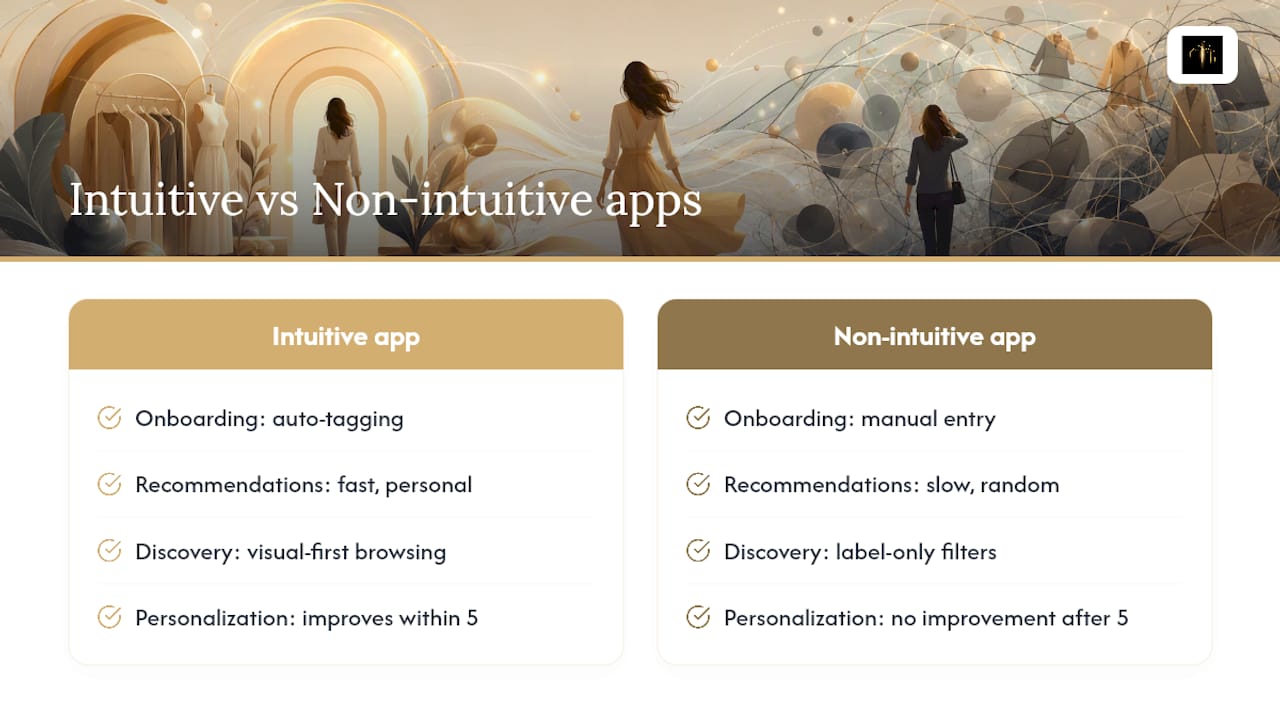
An intuitive app does the heavy lifting. Auto-tagging handles wardrobe setup. Recommendations arrive fast and feel personal. Visual-first discovery tools let you browse by look rather than by label. The app adapts to your feedback without requiring you to re-explain your preferences from scratch.
The practical test: after five sessions, does the app know you better than it did on day one? If recommendations haven't improved, the personalization engine isn't working. That's the clearest signal of a non-intuitive experience.
Common misconceptions about intuitive fashion apps
Misconception 1: "Intuitive means no learning curve." It doesn't. Every app requires some initial input to personalize effectively. The difference is how much and how fast. An intuitive app minimizes setup friction and starts delivering value quickly, but it still needs a few data points to calibrate. Expecting zero effort and instant perfection leads to abandoning good apps too early.
Misconception 2: "'Intuitive' is just a marketing word you can't measure." You can absolutely measure it. Task success rate, time to first outfit, onboarding completion rate, and error rate are all standard UX metrics. If an app can't get you to a complete, relevant outfit in under two minutes on your first try, it hasn't earned the label, regardless of what the marketing says.
Misconception 3: "More features always means more intuitive." Feature count and intuitiveness are often inversely related. An app with 40 filter options and six navigation tabs is usually harder to use than one with three clear paths and smart defaults. The best fashion apps hide complexity behind simple surfaces.
The part most people overlook about "intuitive" design
There's a gap between what the word "intuitive" promises and what actually makes a fashion app worth using every day. Most reviews focus on the AI's output quality: are the outfits good? That matters, but it's the wrong first question.
The right first question is: does the app get out of your way? The best styling tools I've seen, and the ones users stick with, are the ones that require the least conscious effort to operate. Not because they're simple, but because the complexity is handled on the back end. You shouldn't have to think about how the app works. You should only have to think about what you want to wear.
There's also an underappreciated point about seeding. The quality of an app's recommendations is directly proportional to the quality of what you put in. Upload ten items you genuinely love and wear often, rather than your entire closet at once. Rate the first ten suggestions honestly. That early signal shapes everything that follows. Most users skip this step and then blame the AI for generic results.
Pro Tip: Seed your app with your ten most-worn pieces and rate the first batch of suggestions immediately. That 10-minute investment shapes every recommendation you'll receive afterward.
Mytenue fits the checklist, right out of the box
If you've read this far, you know what to look for: fast outfit generation, auto-tagging, visual try-on, weather-aware suggestions, and a personalization engine that actually learns. Mytenue delivers all of it in a single app, available on iOS, Android, and web.
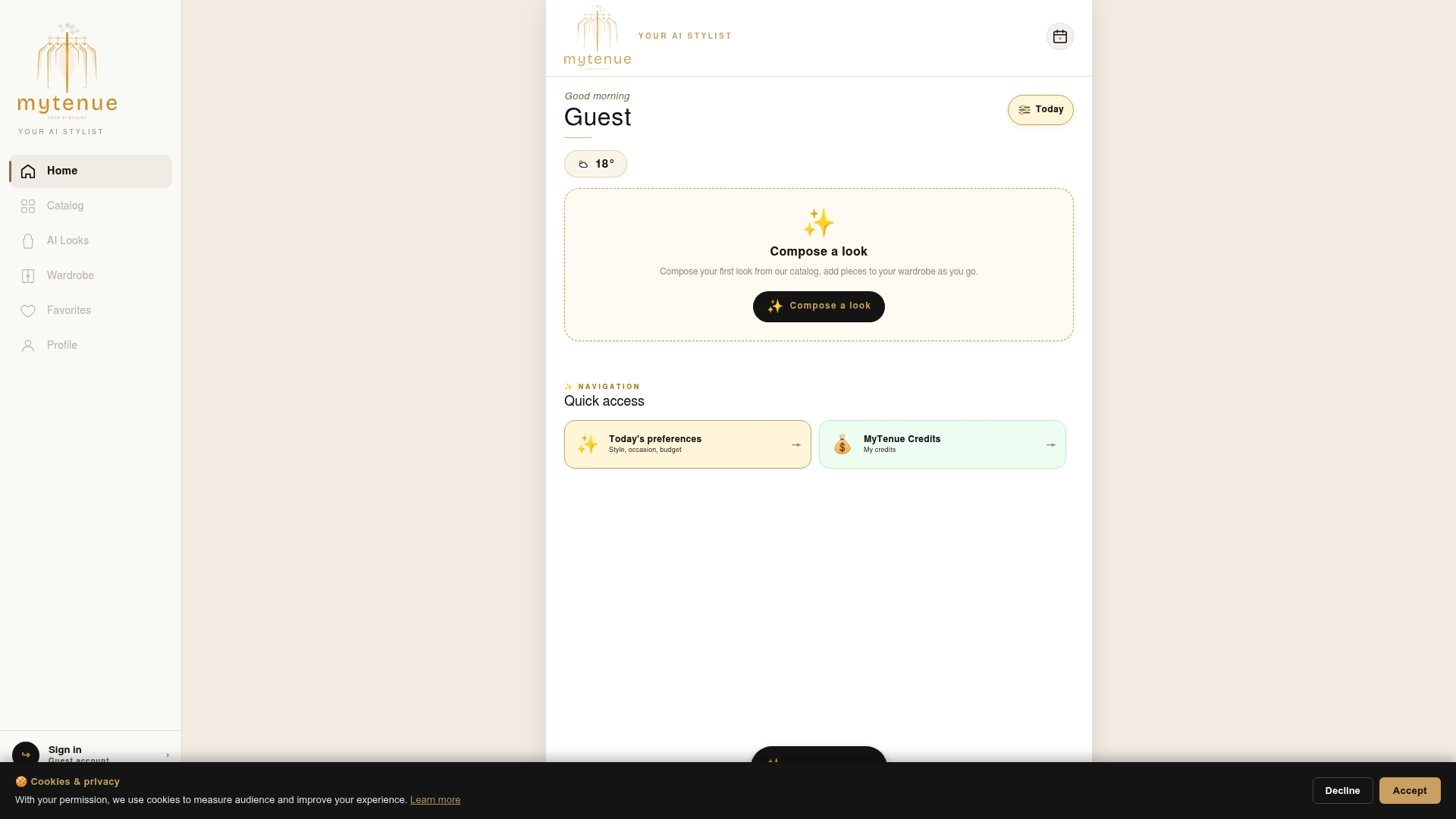
The free tier lets you digitize your wardrobe and receive AI outfit suggestions before committing to a subscription. Premium unlocks the full virtual try-on with personal avatars, calendar planning, and the curated catalog with loyalty credits. For anyone who wants a smarter, more intentional wardrobe without the overhead of a personal stylist, Mytenue is the direct path. Download the app or visit mytenue.com to start your free session today.
Sources
- 10 Must-Have Features For Your Fashion and Apparel Brand Mobile App in 2026
- How Intuitive Is Your Fashion Search? | The Next Gen Visual Search for eCommerce
- Gensmo: AI Stylist & Try-On App - App Store
- What is intuitive? Intuitive definition and importance
- Skeuomorph - Wikipedia