
Predictive fashion technology is an AI personal stylist that reads your wardrobe photos, style preferences, occasion, and local weather to recommend outfits you'll actually wear. Apps like Mytenue apply computer vision, garment classification, and professional composition rules to turn your existing closet into daily, styled looks — complete with virtual try-on and calendar planning. The result: ranked outfit suggestions, editorial flat-lay images, and a weekly outfit plan, all generated from what you already own.
- Your wardrobe photos are the raw material. The AI reads color, fabric, silhouette, and occasion fit.
- Composition rules (lighting, fabric interaction, silhouette balance) shape each suggestion into a cohesive look, not just a list of matching items.
- Outputs include ranked outfit suggestions, a personal avatar for virtual try-on, and calendar-ready plans.
Table of Contents
- How does a predictive fashion app turn photos into outfit recommendations?
- What features should you expect in an AI personal-styling app?
- Why predictive fashion tech is a real advantage for busy people
- How do you pick the right predictive fashion app?
- How to start using predictive fashion tech with your own wardrobe
- What predictive fashion technology can't do yet
- Key Takeaways
- Why this technology matters more than most people realize
- Mytenue puts your wardrobe to work every morning
How does a predictive fashion app turn photos into outfit recommendations?
The pipeline has three stages: inputs, processing, and outputs. Each one matters.
Inputs the app reads:
| Signal | What it captures |
|---|---|
| Wardrobe photos | Garment type, color, fabric, pattern, occasion tags |
| User preferences | Style profile, favorite combinations, dislikes |
| Calendar / occasion | Work meeting, date night, weekend errand |
| Local weather | Temperature, precipitation, forecast for the day |
| Physical features | Body proportions from a selfie for avatar calibration |
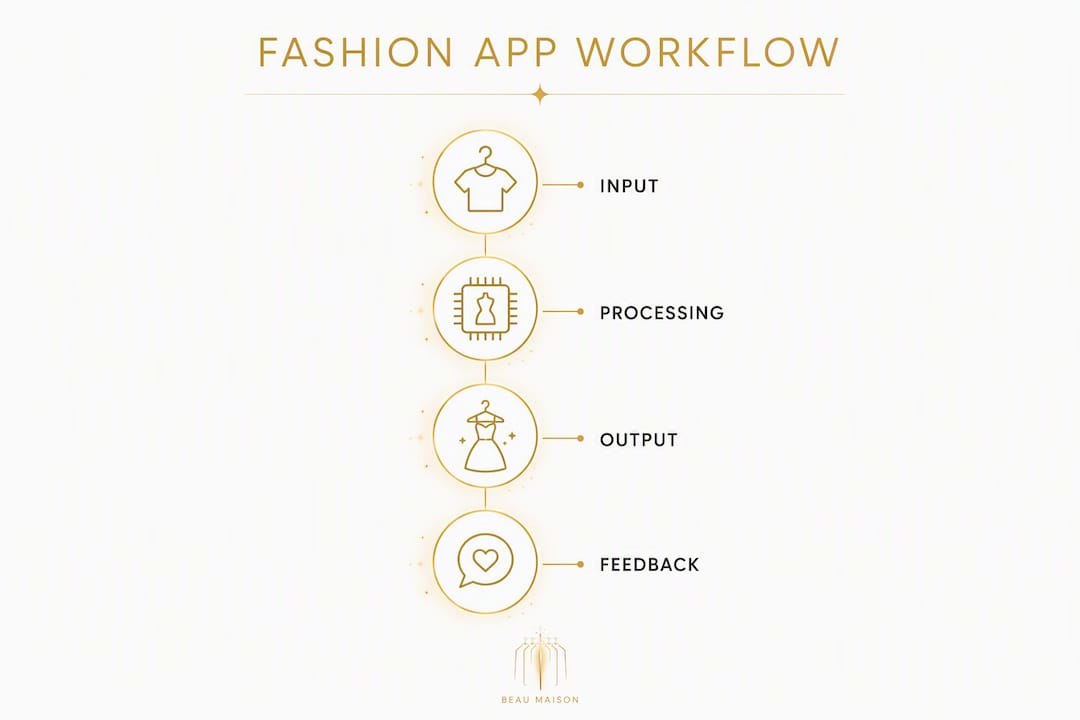
Processing: Once photos are uploaded, computer vision classifies each garment by type and attributes. A multi-agent architecture runs parallel specialist models for weather, occasion, physical features, regional micro-trends, and personality signals. An orchestration layer synthesizes all five into a single styled look. Remove any one signal and the output shifts noticeably.
Composition rules are what separate a great suggestion from a generic one. The system evaluates silhouette balance, fabric interaction, and visual weight before finalizing a recommendation. That's how AI produces editorial-quality images rather than just "these items match."
Outputs: ranked outfit suggestions, a virtual try-on on your personal avatar, editorial flat-lay images, and a calendar-ready outfit plan. The algorithmic pipeline moves from classification to compatibility filtering to final scoring before anything reaches your screen.
"AI-generated complete-outfit recommendations increase shopper confidence by showing how items work together — not just which items are similar." — YesPlz AI
Pro Tip: Rate every suggestion with a quick thumbs up or down. Human-in-the-loop feedback accelerates personalization faster than any preference form — a few days of honest reactions trains the model to your actual taste.
What features should you expect in an AI personal-styling app?
Not every app delivers the same depth. Here's what a full-featured predictive styling app should include:
- Wardrobe digitization with auto-tagging. Upload photos; the AI labels garment type, color, and occasion. Review tags manually to catch errors early.
- Personal avatar and virtual try-on. A selfie-generated avatar lets you see outfits on your proportions before committing. This reduces uncertainty and cuts the "I thought it would look different" problem.
- Weather-aware suggestions. Daily recommendations adjust for temperature and forecast. No more grabbing a blazer on a 90°F morning.
- Occasion-aware recommendations. The app distinguishes between a Monday standup and a Saturday wedding. Occasion tagging is what makes suggestions feel relevant, not random.
- Calendar and outfit planner. Schedule looks ahead of time. Useful for travel packing, event prep, and eliminating the 7 AM wardrobe panic.
- Edit and feedback controls. Thumbs up/down, outfit swaps, and "wear again" logs. These signals are how the AI learns your preferences over time.
- Privacy and data controls. You should be able to view, export, and delete your uploaded photos and wardrobe data at any time.
- Premium catalog and affiliate discovery. Paid tiers typically unlock a curated catalog of shoppable items that complement your existing wardrobe, often with in-app credits or loyalty rewards.
Pricing reality: Most apps offer a free tier with limited wardrobe slots and basic suggestions. Paid subscriptions unlock avatar try-on, unlimited wardrobe items, calendar integration, and the premium catalog. Watch for in-app credit systems tied to affiliate purchases — they can add value or add cost depending on how you use them.
Why predictive fashion tech is a real advantage for busy people
The clearest benefit is time. Deciding what to wear takes mental energy that compounds across a week. An AI that pre-selects three ranked options each morning removes that friction entirely.
Beyond speed, the practical wins stack up:
- Morning decisions: Wake up to a weather-appropriate, occasion-ready suggestion. No deliberating.
- Travel packing: Build a week of outfits from a subset of your wardrobe before you pack. Fewer items, more combinations.
- Event dressing: Input the occasion and date; the app surfaces looks you'd otherwise overlook.
- Rediscovering underused items. AI-driven outfit building surfaces garments you forgot you owned. That's more outfits per item and fewer impulse purchases.
The sustainability angle is real. Higher wardrobe utilization means less clothing waste and fewer unnecessary purchases. When an app shows you 12 new combinations from items already in your closet, the pressure to buy something new drops. Complete-the-look recommendations drive this effect by showing how existing pieces work together rather than pushing new acquisitions.
How do you pick the right predictive fashion app?
Evaluate on these criteria before you commit to a subscription:
| Criterion | What to check |
|---|---|
| Garment detection accuracy | Does it correctly classify tops, bottoms, outerwear, and accessories? |
| Virtual try-on quality | Is the avatar calibrated to your proportions, or is it a generic mannequin? |
| Weather and calendar integration | Does it pull live weather and sync with your calendar app? |
| Feedback controls | Can you rate, swap, and log outfits to train the AI? |
| Privacy and data export | Can you delete your photos and wardrobe data on demand? |
| Pricing transparency | Are premium features clearly listed, with no hidden affiliate-driven upsells? |
Questions to ask during a free trial:
- How many wardrobe photos do you need before useful suggestions appear?
- How is avatar accuracy measured, and can you recalibrate after a selfie update?
- Where is your wardrobe data stored, and who can access it?
- How do you delete your account and all associated images?
- Are affiliate-linked items labeled as such in recommendations?
Red flags: opaque data-sharing policies, no feedback or rating controls, avatar imagery that looks nothing like your body type, and recommendations that consistently push new purchases over existing wardrobe items.
Onboarding timeline: Most apps surface useful suggestions after 20–30 wardrobe items are uploaded and tagged. Expect the first week to feel generic. By week two, with consistent feedback, recommendations sharpen noticeably.
Pro Tip: During your free trial, upload your most-worn items first. That core wardrobe gives the AI enough signal to produce relevant suggestions quickly, without the noise of rarely worn pieces.
How to start using predictive fashion tech with your own wardrobe
- Photograph your items (30–60 min). Lay each piece flat on a neutral background. Shoot in natural light. One photo per item is enough for most apps.
- Review auto-tags (15 min). Check that the AI correctly labeled garment type, color, and occasion. Fix obvious errors — a misclassified blazer as a jacket will skew suggestions.
- Set your style preferences (5 min). Choose preferred aesthetics, occasions you dress for regularly, and any items you never want suggested.
- Upload a selfie for avatar calibration (2 min). A front-facing photo in fitted clothing gives the model your proportions for virtual try-on accuracy.
- Link your calendar and location (2 min). This activates weather-aware and occasion-aware suggestions immediately.
- Rate your first five suggestions (ongoing). Thumbs up, thumbs down, or swap individual items. This is the fastest way to train the AI.
Four of the five AI agents that drive recommendations — weather, location, occasion, and physical features — are active from session one. The personality and taste model sharpens with every interaction. For a deeper walkthrough of the digitization process, the Mytenue wardrobe analysis guide covers photo framing, batch sessions, and tagging best practices.
Pro Tip: Do a batch photo session on a Sunday afternoon. Group items by category (tops, bottoms, outerwear) and photograph them in sequence. You'll finish a full wardrobe upload in under an hour.
What predictive fashion technology can't do yet
AI styling is genuinely useful, but it has real limits worth knowing before you rely on it for a high-stakes event.
"Academic prototypes like StyleVision validated 2D/3D outfit visualization but also highlighted ongoing work needed to improve 3D fidelity and broader garment category coverage." — MDPI / StyleVision
Current limitations:
- Garment misclassification. Computer vision uses confidence thresholds and falls back to safe labels when uncertain. Unusual cuts, prints, or layered items still trip up classifiers.
- Avatar fit inaccuracies. Virtual try-on is improving, but 3D drape and fabric behavior remain approximate. A fitted dress on your avatar may not reflect real-world fit.
- Cold-start limits. With fewer than 15–20 items uploaded, suggestions are generic. The AI needs volume to find patterns.
- Cultural and aesthetic bias. Models trained on limited datasets may underserve certain body types, skin tones, or cultural dress codes. Feedback helps, but the gap is real.
- Composition errors. Occasionally the AI pairs items that technically match on attributes but look off together. Trust your eye over the algorithm for critical occasions.
On privacy: Before uploading wardrobe photos, read the app's data policy. Confirm where images are stored (on-device vs. cloud), whether they're used to train shared models, and how to request deletion. For virtual try-on and wardrobe digitization, your selfie data is especially sensitive — verify it's not shared with third parties.
Key Takeaways
Predictive fashion technology works best when you treat it as a collaborative tool: the AI handles the pattern-matching, and you supply the feedback that sharpens it over time.
| Point | Details |
|---|---|
| What it is | An AI personal stylist that reads your wardrobe, occasion, and weather to suggest outfits. |
| Top features to prioritize | Look for avatar try-on, weather integration, calendar sync, and clear feedback controls. |
| Fastest onboarding action | Upload your 20 most-worn items first and rate the first five suggestions immediately. |
| Privacy check before uploading | Confirm data storage location, third-party sharing policy, and deletion options. |
| Mytenue's approach | Mytenue combines wardrobe digitization, avatar try-on, weather-aware suggestions, and a premium catalog in one freemium app. |
Why this technology matters more than most people realize
There's a tendency to frame AI styling as a convenience feature — a nice shortcut for indecisive mornings. That undersells what's actually happening. When an app applies composition rules, multi-agent signal synthesis, and a feedback loop to your specific wardrobe, it's doing something a personal stylist charges hundreds of dollars per session to do.
The more interesting shift is behavioral. People who use these apps consistently report wearing more of what they own. That's not a small thing. The average American closet is full of items worn fewer than a handful of times. An AI that surfaces those items in new combinations doesn't just save time — it changes the relationship between you and what you already have.
The limits are real, and I'd be cautious about relying on any app for a job interview or a wedding without a human sanity check. But for daily dressing, travel planning, and rediscovering your wardrobe? The technology is already good enough to be worth your time. The gap between "interesting prototype" and "genuinely useful daily tool" closed faster than most people expected.
Mytenue puts your wardrobe to work every morning
Your closet already has more outfit potential than you're using. Mytenue's AI personal-styling app unlocks it — wardrobe digitization, a personal avatar for virtual try-on, daily weather-adapted suggestions, and a calendar planner, all in one place.
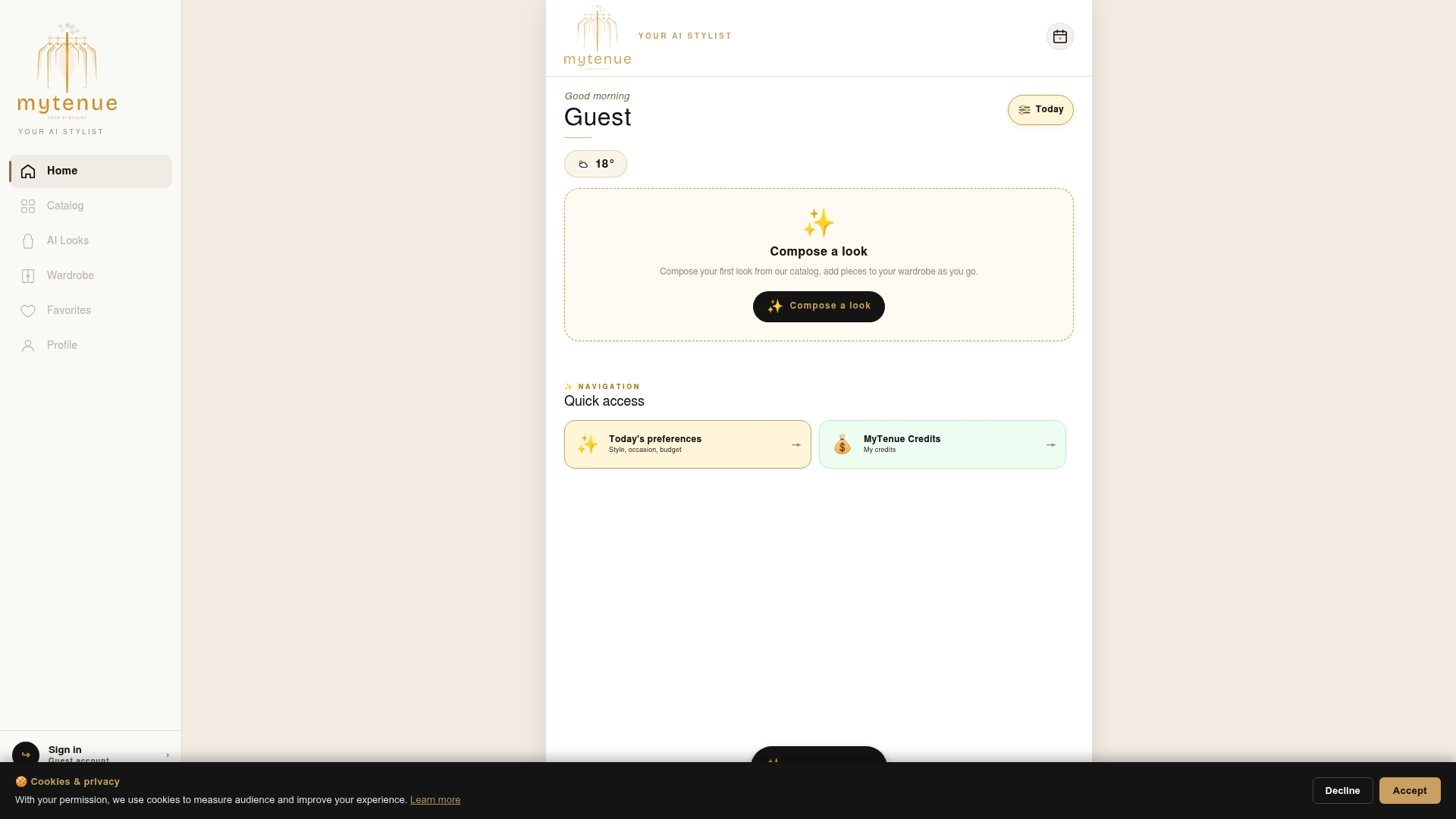
The free tier gets you started with wardrobe uploads and basic outfit suggestions. A premium subscription adds unlimited wardrobe slots, avatar try-on, the full catalog with loyalty credits, and occasion-aware planning. Your wardrobe data stays yours — Mytenue gives you full control over your photos and account at any time.
Ready to see what your closet can actually do? Try Mytenue free on iOS or Android and get your first AI-styled look today.